







利用AI写了一个镶嵌在自己网站的公告代码
作者:小编日期:2026-02-22浏览:5447分类:只有源码
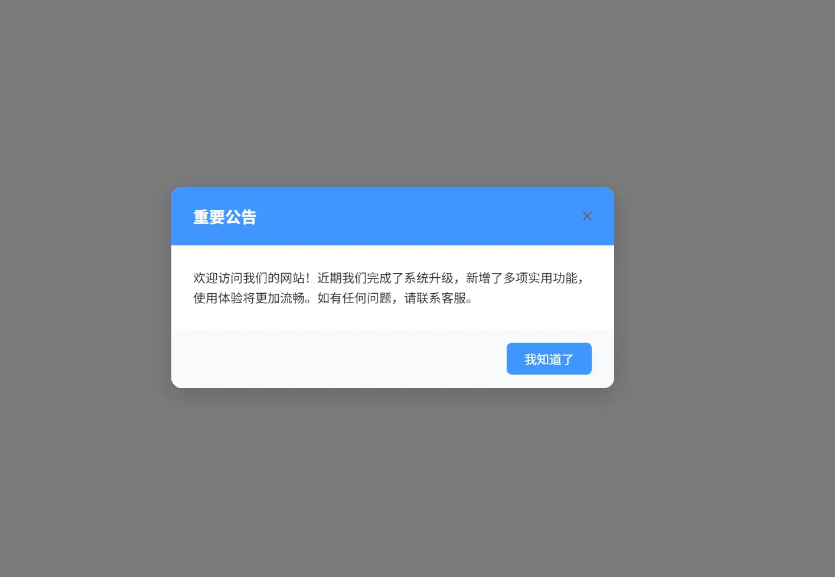
<!-- 公告弹窗 -->
<div id="announcement-modal" class="announcement-modal">
<div class="announcement-content">
<button id="close-announcement" class="close-btn">×</button>
<div class="announcement-header">
<h3>重要公告</h3>
</div>
<div class="announcement-body">
<p>欢迎访问我们的网站!近期我们完成了系统升级,新增了多项实用功能,使用体验将更加流畅。如有任何问题,请联系客服。</p>
<!-- 你可以修改这里的公告内容 -->
</div>
<div class="announcement-footer">
<button class="confirm-btn">我知道了</button>
</div>
</div>
</div>
<style>
.announcement-modal * {
margin: 0;
padding: 0;
box-sizing: border-box;
font-family: -apple-system, BlinkMacSystemFont, "Segoe UI", Roboto, sans-serif;
}
.announcement-modal {
position: fixed;
top: 0;
left: 0;
width: 100%;
height: 100%;
background-color: rgba(0, 0, 0, 0.5);
display: flex;
justify-content: center;
align-items: center;
z-index: 9999;
opacity: 0;
visibility: hidden;
transition: opacity 0.3s ease, visibility 0.3s ease;
}
.announcement-modal.show {
opacity: 1;
visibility: visible;
}
.announcement-content {
background-color: #ffffff;
width: 90%;
max-width: 500px;
border-radius: 12px;
box-shadow: 0 8px 24px rgba(0, 0, 0, 0.15);
overflow: hidden;
position: relative;
transform: translateY(-20px);
transition: transform 0.3s ease;
}
.announcement-modal.show .announcement-content {
transform: translateY(0);
}
.close-btn {
position: absolute;
top: 15px;
right: 15px;
background: none;
border: none;
font-size: 24px;
color: #666666;
cursor: pointer;
width: 30px;
height: 30px;
display: flex;
justify-content: center;
align-items: center;
border-radius: 50%;
transition: background-color 0.2s ease;
z-index: 10;
}
.close-btn:hover {
background-color: #f5f5f5;
color: #333333;
}
.announcement-header {
background-color: #4096ff;
color: white;
padding: 20px 25px;
}
.announcement-header h3 {
font-size: 18px;
font-weight: 600;
}
.announcement-body {
padding: 25px;
color: #333333;
line-height: 1.6;
}
.announcement-body p {
font-size: 14px;
margin-bottom: 0;
}
.announcement-footer {
padding: 15px 25px;
background-color: #f8f9fa;
text-align: right;
}
.confirm-btn {
background-color: #4096ff;
color: white;
border: none;
padding: 8px 20px;
border-radius: 6px;
cursor: pointer;
font-size: 14px;
transition: background-color 0.2s ease;
}
.confirm-btn:hover {
background-color: #337ecc;
}
@media (max-width: 480px) {
.announcement-content {
width: 95%;
}
.announcement-header {
padding: 15px 20px;
}
.announcement-body {
padding: 20px;
}
.announcement-footer {
padding: 15px 20px;
}
}
</style>
<script>
// 公告弹窗核心逻辑
document.addEventListener('DOMContentLoaded', function() {
const modal = document.getElementById('announcement-modal');
const closeBtn = document.getElementById('close-announcement');
const confirmBtn = document.querySelector('.confirm-btn');
// 从localStorage获取关闭时间
const closeTime = localStorage.getItem('announcementClosedTime');
const now = new Date().getTime();
const thirtyMinutes = 30 * 60 * 1000; // 30分钟的毫秒数
// 判断是否需要显示弹窗:没有关闭记录 或 关闭时间已超过30分钟
if (!closeTime || (now - closeTime) > thirtyMinutes) {
modal.classList.add('show');
}
// 关闭弹窗的通用函数
function closeModal() {
modal.classList.remove('show');
// 记录关闭时间到localStorage
localStorage.setItem('announcementClosedTime', new Date().getTime().toString());
}
// 绑定关闭按钮事件
closeBtn.addEventListener('click', closeModal);
confirmBtn.addEventListener('click', closeModal);
// 可选:点击遮罩层关闭弹窗
modal.addEventListener('click', function(e) {
if (e.target === modal) {
closeModal();
}
});
});
</script>
相关文章
- 09-12 彩虹外链网盘二开美化版惜染
- 09-09 全网视频在线免费解析无需注册
- 09-07 AI 图片创作系统(免费无授权版)
- 09-07 聚丰祥软件园网络拓扑图设计工具源码
- 09-05 服务器版【死了么】,免费部署在vercel, 自定义配置内容,定时发送,多邮箱收件人
- 09-02 个人整改后做的html版网页密码管理系统
- 09-02 一款极简的网址导航源码 免服务器部署在cloudflare上
- 08-29 16合一代付小程序源码
- 08-28 智能客服官网引导页HTML源码——零依赖、自适应、开箱即用的通用官网
- 08-26 基于Python+RAG智能客服系统源码
- 08-26 php奇云多应用授权系统|万能在线更新页面
- 08-25 资源发布网同款引导发布页源码
取消回复欢迎你发表评论:

- 协助本站优化一下
- 最近发表
- 1重生了还逼我恋爱?/重生了还要我谈恋爱?
- 2摸鱼助手V1.0(PC与安卓之间音频/投屏/传输文件/老板键/粘贴板同步)
- 3影视飓风 AI实战课:零基础也能做AI视频
- 4AIGC影视大师课,AI视频全流程实战指南
- 5【激活码】win10/win11专业版
- 6ExeSimplePackager 简易程序打包器 v1.0
- 7利用 openclaw-weixin 做一个通知系统
- 8《动物酒馆:毫无人性》中文版
- 9《污痕圣杯:阿瓦隆的陨落》中文联机版
- 10京东0.98-1元衣架/花洒/胶带等
- 11京东百亿补贴米家冰箱券后699元
- 12百丽联名女童运动鞋2026秋款上新
- 13《深度求财:挖打撤》中文版
- 14比亚迪博物馆免费预约攻略
- 15有了AI,程序员的路该何去何从
Copyright© XGW9.COM版权所有〖小庚资源网〗
〖恒创科技〗为本站提供专业云计算服务
本站发布的内容来源于互联网,如果有侵权内容,请联系我们删除!E-mail:xgzyw6@outlook.com
关于我们|我要投稿|免责声明|XML地图
暂无评论,来添加一个吧。